Total Pageviews

Thursday, June 10, 2021

Land of Storms - Love Among 3 Men

  Loving someone from the bottom of one's heart disregards of the gender sometimes is not as easy as one can imagine. We are living in a community full of different eyes, hatred and indifference. If we are asked which film is the most well-known one about homosexuality, many of us would bring out Brokeback Mountain. There is one spreading film review saying that there is one Brokeback Mountain in everyone's heart. That well interprets the central theme of the film. Land of Storms, another film centers on the theme of gay, maybe not as well-known as Brokeback Mountain, still stir the heartstrings with its elaborated plots and evocative visuals.


  The film is based on a real story from Hungary. Due to some ineffable reasons, some factors of the story which the film is based on are discarded. We have provided some reality and explanation of the film clips in the article.


Land of Storms: Plot

  The main plot of the film is about a young man named Szabolcs who returns home to Hungary after having fight with his roommate from the same football team and quitting his budding football career in Germany. The relationship is something full of mystery that it makes him bump with another man Aron who is from the nearby town and tried to steal his motorbike. Instead of turning him in, Szabolcs has Aron repair the house together. More precise details about the film is coming next.


  Szabolcs is a talented but passionless football player in an amateur German team. He is sent off the court with a red card for mangling the match. It has resulted in the leave of a league scout. Then he provokes a flight with his best friend Bernard for being stared by him. As a result, he returns to his dilapidated family in rural Hungary and farms beer instead.

  One night, he bumps into Aron, another young man from the nearby town, trying to steal his motorbike. He knocks him out and instead of handing him to the police, he stays with him until Aron is back from the coma. He has Aron help him repair his house. They become friends and because of living far away from the noisy city center, they quickly build a deepened relationship without being talked and disrupted by the outside world.


  The film reaches its climax at one night, after going swimming and drinking too much, little is Aron aware of what is going on and Szabolcs gives him a handjob. Aron is straight-identified, and he is confused about their relationship. After that night, he keeps returning to help Szabolcs with the house and their relationship develops deeply.

  Aron’s mother, a disabled woman taken care of by Aron, hears from him about the relationship between him and Szabolcs. Then it is spread over and raising the hatred of the conservative community. It is the complexity of feeling in Aron’s heart tortures him and turn him to stay away from Szabolcs. Occasionally, Bernard arrives in Hungary, which makes the relations in tension. Bernard expresses an interest in a relationship with Szabolcs and tries to convince him back to the previous football team with him.

  The triangle relationship among them has continuously developed and eventually Szabolcs chooses to stay in Hungary with Aron, and Bernard returns to Germany unwillingly and jealously.


  It is not until Aron’s mother on her deathbed does Aron return home to see her off. Aron takes his mother to the hospital when she is still in coma. His mother’s death and the animosity of the villagers have turned him in a dilemma. Finally, he returns to Szabolcs and having a final sex with him before stabbing him in his chest.

Land of Storms: Reality

  According to the review and discussion about the film, the real story is taken place in Hungary. Both of the leading characters are killed and dismembered by the third person coming between them. However, the director didn’t imbue the reality of the story into the film for the concern about reversing the theme of the film. If the film was created as the real story tells, it would turn out to be a film filled with jealousy and psychopath but not with homophobia.

  What the director really wants to feature the film is the royalty to religion in Eastern Europe. People there have no means for resolving the idea about homophobia, and it is the homophobia that led to a murder eventually. With the sexual preference spread to the conservative community, Szabolcs and Aron are assaulted and discriminated by the surrounding groups. The plots in the film well mirrors the reality in Hungary and even the whole Eastern Europe.

  Why can’t we just isolate the plots of film with the reality of the story? Sometimes it is unnecessary to learn the reality before getting into the film. Knowing the reality might satisfy the one’s curiosity, but it does no good to appreciating the film.


Land of Storms: Explanation of Film Clips

  After finishing the whole film, there are some film clips deserve deeper interpretation. Here are some explanation film clips.

Question 1: Why does Szabolcs burst out fighting with Bernard for just one stare at him?

  At the beginning, Szabolcs doesn’t completely admit his sexual preference from the bottom of his heart. He is going through a process of knowing himself and accepting his real interest in male. It is the stare and expression in Bernard’s eyes that evoke him and put him into a more entangled situation. In order to relief himself from mental tension, he burst out having a fight with Bernard and flee from the football team.


Question 2: Why does Szabolcs and Aron masturbate each other once after the window is removed?


  This is the most shining part of the film well-designed by the director for creating fascinating ambience and leading the audience into the film deeply. When they are carrying the window between them and going to install it on the window frame, they stare each other on each side to the well-polished window. The window is not only a substantial barrier between them, but also a piece of membrane waiting for them to break through. As soon as it is removed, the desire from the heart is ignited and turning into a flaring fire.


Question 3: Why is the film ending up with Aron kills Szabolcs instead of Bernard kills Szabolcs?

  It is acceptable that the film ends with both results. Szabolcs deserves it since he is not loyal to love. Aron devotes himself in the relationship with Szabolcs who in return betrays him. Notwithstanding the betrayal, Szabolcs finally chooses Aron, leaving Bernard returning to Germany all by himself. Bernard is depressed and desperate enough to kill Szabolcs, which happens exactly in reality.

Question 4: The reason why Aron kills Szabolcs remains incomprehensible to many audiences.

  Szabolcs still has sex with Aron right before he is killed by Aron. That happens all of a sudden but if we track back to the previous plots, it makes sense. Aron’s mother suicides with Aron’s absence, which makes Aron feel guilty. Meanwhile, he is withstanding different eyes and pressure from public opinions and couldn’t drag himself out from it. Each time he touches Szabolcs, he feels a compulsive power pushing him to do it with Szabolcs. The complexity of guilty and desire for sex makes him confused, and finally he commits a murder.


Where You Can Get Land of Storms for Free?

  Land of Storms is not an open source to be viewed on all the video platforms. Only some video websites support free streaming, including YouTube, Xmovies, m4uhd.tv, 9Movies, divicast and cineb.net. These video websites are free for streaming Land of Storms but due to copyright protection, the film might be blocked in some regions. To solve this issue, we recommend one professional video downloader for watching blocked videos in your country, the Leawo Video Downloader.


  Leawo Video Downloader not only offers solutions for streaming online videos with its powerful built-in browser, but also offers solutions for downloading 720P/1080P Videos, Music Videos, TV Shows, and Even Live Streaming Videos from 1000+ sites at 6X Higher Speed. It is free to download videos up to 4k with the help of Leawo Video Downloader.

  Apart from watching downloaded video with the built-in video player in Leawo Video Downloader, watching it on Leawo Blu-ray Player gives you better viewing experience. It is a totally free media player with solutions for playing high resolution videos as well as DVD disc, DVD folder and DVD ISO image file.


Tuesday, June 8, 2021

Everything You Should Know about Security Camera Footage

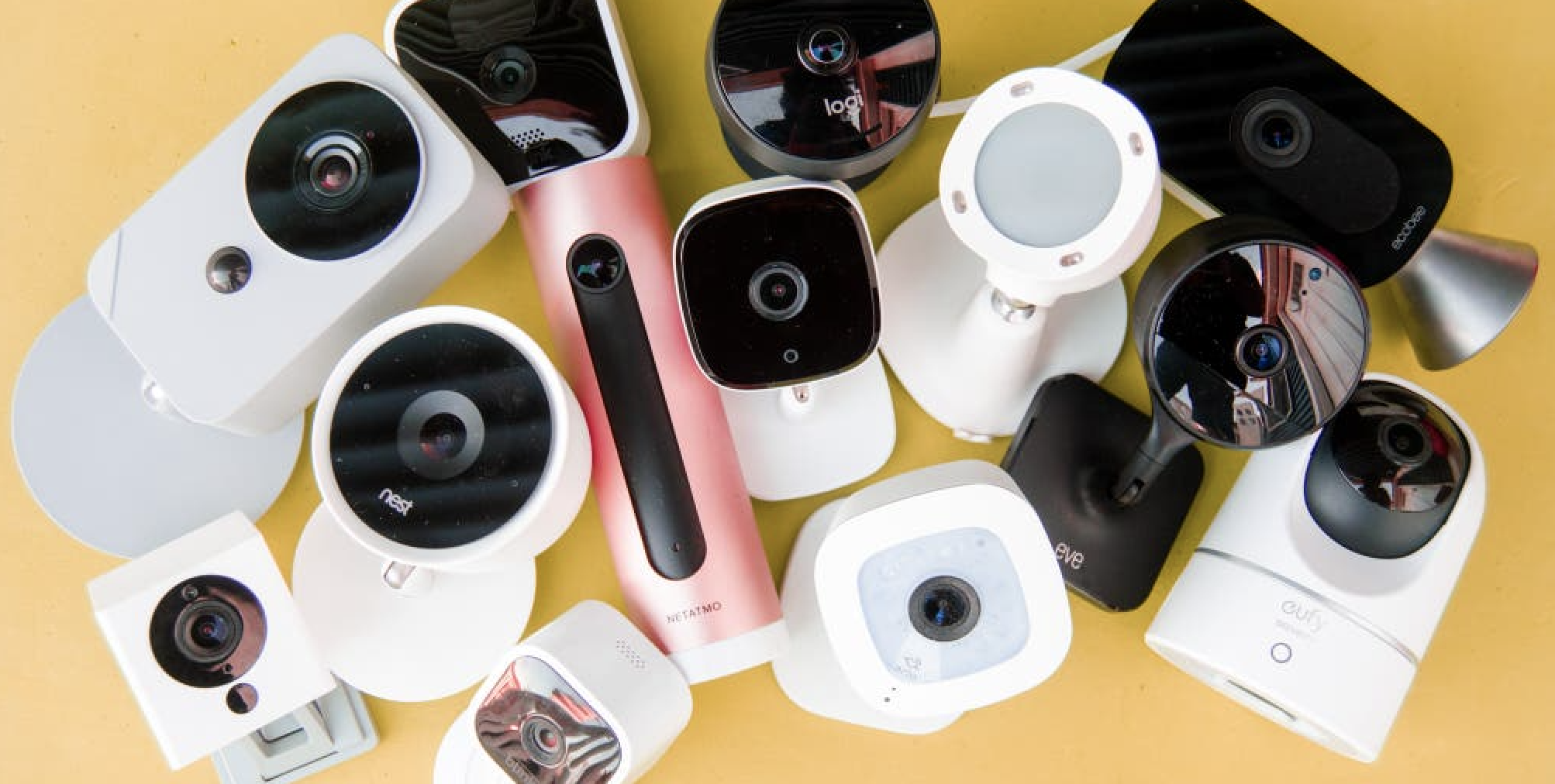
Surveillance is crucial to today’s society, whether for your business or sweet home. With a good security camera, you can have higher levels of security each day. These days, whether you need a single camera or build a whole security system, there are a good variety of different types of security cameras out there for you to choose from. So how many types of security cameras are there and which one is right for you? Here’s everything you should know about it. 

Part 1: Types of Security Camera
Part 2: How to Choose Security Camera?
Part 3: How to Watch Security Camera Footage?
Part 4: Why I Cannot Play Security Camera Footage and Solution?
Part 5: Tips on Security Camera Footage


Part 1: Types of Security Camera

Security cameras in the earlier years were big and bulky. They are often applied in the business rather than for home. With technological progress, people are provided with more options to choose from, especially when it comes to indoor and home security cameras. Here we’ll mainly introduce several types: wired and wireless security cameras; home and industrial security cameras.


Wired security camera

Wired security cameras are often seen in use for indoor and home security. This is because they are required to connect to a power source and the internet by cables. Wired security cameras guarantee more reliable and continuous monitoring because they are directly connected to the recording device with a coaxial cable or ethernet cable.


Wireless security camera

When it comes to the term wireless, it mainly refers to the way of communication, not the way a camera is powered. Wireless cameras use Wi-Fi to transmit footage whereas wired security cameras rely on cable. Wireless security cameras can either be powered by AC power or batteries. When a wireless security camera is powered by batteries, it is normally called a wire-free camera.


Home security camera

As the name suggests, home security cameras are mainly for the surveillance of your home property. They can be wired or wireless, or wire-free in terms of how the camera communicates. Home security cameras increase the sense of security and be an excellent deterrent to criminals. These days, home security cameras are not just for protection, but also a great monitor for children and pets when you are not at home. There are mainly two types of home security cameras: indoor and outdoor. Most indoor cameras offer full 360-degree coverage, making them perfect for monitoring your entire home. Outdoor cameras are often mounted on walls or ceilings, or the backyard for outdoor detection.


Commercial security camera

Security cameras for commercial usage are way more complex than home security cameras. Most commercial security cameras can be applied in many facilities such as office complexes, shopping centers, hotels, etc., which require a robust surveillance system to guarantee safety. Some commercial security cameras are equipped with intelligent systems to handle massive surveillance footage and improve operational flexibility. Most outdoor Commercial security cameras are more durable compared to home security cameras. They are weather-resistant and equipped with more advanced features for intensive surveillance.  


Part 2: How to Choose Security Camera?

Now you have learned the main types of security cameras, so how to choose the best one among tons of options. Here are a few things you might want to figure out before you choose a proper camera.


Which part of your home needs surveillance. For instance, the place where a burglar enters or passes through.

Where to plug. Is there a power source nearby to connect to the camera? Sometimes you’ll need to drill through walls to install the camera.

Determine the budget. There are many home security cameras on the block, ranging from basic to advanced. Choose one that suits your budget.

Here are a few important features that you can look into when you look for a home security camera.


Video quality: This is the key feature of security cameras. These days most home security cameras offer high-definition video(HD), some of them even provide super HD(2K resolution) or ultra HD(4K) which are better for zooming into details.


Storage: Most security cameras store footage in the cloud. While some cloud services are free, some require extra fees. Some security cameras are equipped with SD cards for storage. Just pick one that suits your budget.


Audio & Communication: The feature offers a two-way talk capability that allows you to see and hear what’s going on.


Motion Activation: The security camera can start recording when it detects any motion.


Field of View: A home security camera should have a field of view between 130 and 180 degrees. Some cameras can offer 360 degrees coverage, which is good to monitor the entire home.


Night vision: This feature is essential for outdoor security cameras. A proper outdoor camera should be able to have 50 feet in the dark with infrared technology.


Part 3: How to Watch Security Camera Footage?

Whether you store your footage on cloud storage or SD card, you can view recorded security camera footage with your computer and mobile phone. Most security camera sellers offer software and mobile apps that let you view the footage. You can either watch the live feed remotely with the app or computer with the steps below.


Download and install the software or app on your computer and mobile phone.

Launch the app and set it up with your security camera.

Configure the proper settings like video quality, audio communication, etc.

Click the camera and you can watch the live footage of the security camera.


If you want to view the previously-stored security footage on the cloud, you can access them through the software or apps as well. For footage that is stored in the SD card, simply connect the SD card to your computer using a card reader. Most security camera footage is in common video formats like AVI, MP4, MPG, etc. So you can play them easily with most media players.


If you want to have the best video quality of the footage, it’s better to use a decent media player like Leawo Blu-ray Player. It’s the most professional media playback solution in the world and is the best free player for 4K Blu-ray. Leawo Blu-ray Player is so powerful that it can not only play Blu-ray discs, DVDs, HD videos, audio, etc. but also BDAV movie folders and Blu-ray ISO image files. Leawo Blu-ray Player can help you to extract your security camera footage at the best image quality, thanks to its core advanced technology. With Leawo Blu-ray Player, you can play 4K Blu-ray movies with the best image quality! Besides that, from old formats to the next-generation codec, Leawo Blu-ray supports them all, you can play UHD format like HEVC with Leawo easily!


Part 4: Why I Cannot Play Security Camera Footage and Solution?

There are times you can’t seem to view the security camera footage. There are many reasons for that. First off, make sure your DVR is working properly to record the footage. If you have ruled out the problem with DVR, then it’s more likely the issue with video format, especially when you are using a video player other than the one that comes with the security camera. The most often seen video formats for security camera footage are AVI, MP4, MPG, ASF, FLV, DAV, SV4, SV5, SSDV. You can export the footage with the supporting formats to fix the issue. If you can’t find a proper format, just export and convert them to the formats that are compatible with your video player using Leawo Video Converter.


Part 5: Tips on Security Camera Footage

There are a few things to keep in mind when you choose a security camera: your privacy and security.

Privacy: Given security camera footage is the recordings of your home and property, it’s better to keep the footage safe and private. For instance, use a geofencing feature that can turn it off when you are at home and switch it back to service when you leave. This is to protect your privacy from recording when you are home.

Security: Set up a strong password to protect your privacy from hacking. Features like two-factor authentication can be helpful to reduce the risk of being hacked. On top of that, see if your security camera footage can be encrypted over the cloud storage to guard against hacking. These are features worth noticing when you choose a security camera.


Wrap Up

That’s everything you should know about security camera footage. A good home security camera is a useful tool to protect our home and property as it can help with recovery and detection. If you have security footage that doesn’t seem to play, try Leawo Blu-ray Converter to help you fix it by converting the formats. It’s the simplest solution when you have a problem playing any video!


Sunday, June 6, 2021

Everything about 360 Video videos

 Have you ever seen 360 videos before? It’s stunning! Unlike any regular video we have seen, a 360 video is recorded in all directions. It captures everything and gives you a complete 360-degree view. It’s one of the latest video forms and it allows you to appreciate everything from a brand-new perspective. Are you new to 360 videos? If you want to know more about the video, then this article is precisely what you need! Just read on.


Part 1: What is 360 Video?
Part 2: What's the Difference between 360 Video and VR?
Part 3: What Format is 360 Video?
Part 4: How do I Make 360 Video?
Part 5: How to Watch 360 Video?


Part 1: What is 360 Video?

Let’s define 360 videos first before everything else. 360 videos, also known as immersive videos, or spherical videos, are videos that are shot from all angles at the same time with an omnidirectional camera or using multiple cameras setup. Compared to the regular video, 360 videos have no fixed frames to limit your view. The camera is pointing everywhere,

offering you a cinematic experience like sitting in the director’s chair. With 360 videos, you are the center of the action! You can choose to look up and down, or all around, exploring the scene from whatever perspective you would like.


While traditional videos are still the mainstream, 360 videos free you from space and distance by liberating your eyes. Surrounded by sights and sound, you are no longer a watcher but part of the scene. The purpose of 360 videos is to create an immersive experience with a full 360º x 180º panoramic field of view. The video can be played on your computer or any projector setup with a sphere. These days you can find a slew of 360 videos on YouTube, or Facebook, which allows you to view the video in the “magic window.”


Part 2: What's the Difference between 360 Video and VR?

While 360 videos offer people an immersive experience just like virtual reality, so what’s the difference between them? Admittedly, given these two videos provide you with a captivating experience as if you were part of the scene, they are sometimes used synonymously. However, there are a few differences in terms of creation, photography, and the ways you view these videos.


1. Creation and photography

A 360 video is made by live-action shooting with physical cameras, just like the traditional videos. Whereas VR video is created within the digital environment using computer technology. Besides that, the way they are created also differs greatly. 360 is shot in a linear timeline which follows the filmmaker’s camera movement, while virtual reality is more of a space that allows users to access a series of events or experiences.  


2. Story and content

With 360 videos, the story must be shot to capture the attention of viewers. Just like how they made traditional videos, the filmmaker still controls the physical location of the camera to direct a story. Whereas in virtual reality, the story is used to motivate users to travel independently. The viewer’s physical location is not controlled by the director, which means viewers are free to move as they like.


3. How to watch

360 is more accessible as you can find them on most video-sharing platforms, which means you can simply watch it like normal videos using a computer or mobile phone. But with VR, you will need to have a headset that can offer you a truly immersive experience. Even though 360 videos liberate your angles, viewers are limited to the camera movements. Virtual Reality, on the other hand, offers an immersive world that you can walk around.


Part 3: What Format is 360 Video?

Even though 360 video is novel in a way that frees our perspective, it is not difficult to access 360 videos. As aforementioned, 360 videos are made just like traditional videos with cameras, so they share the same format, mostly MP4. You can find the 360 videos in MP4 on YouTube. The 360 video is a non-interactive format, unlike virtual reality that is created specially and requires serious headsets, 360 video is like normal videos that can be seen in 2D or 3D.


Part 4: How do I Make 360 Video?

Now you have learned what a 360 video is, are you tempted to make one yourself? It’s not as hard as you imagine, as long as you have decent cameras and some basic shooting skills as well as a good story! Now let’s get into things.

Dedicated camera   

To make 360 videos, you will need either an omnidirectional camera or a dedicated camera with multiple camera lenses, which allow you to capture everything simultaneously. Additionally, video stitching, a method that is used to separate and merge footage into a video piece is also required. Video stitching can either be done by the camera itself or with a special program, which is an analyzer for visual and audio, as well as a synchronizer to put separated footage into a 360 video.


Content-wise       

Given 360 videos offer a spectacle of omnipresent view, the viewing experience is more highlighted here. However, before you shoot a 360 video, there are a few principles worth noting when it comes to the stories.


360 video offers viewers moments that are hard to visualize, so try to create a captivating video that can build a sense of awe.

Emotions help to build a connection between your video and audiences. Remember to lead the audience to a world and make them “be there.”

Try to catch your audience’s attention, it can either be sound or visual that helps to incite their interest and “look around.”


Part 5: How to Watch 360 Video?

360 videos are normally viewed via computers, mobile devices, or VR headsets. They are now available on YouTube or Facebook, and you can just watch them as you normally would. Click the Play button, sit back, and you are good to go. It is worth noting that 360 videos allow you to change the viewing perspective by clicking or dragging in the video screen, which makes it a bit tricky for some devices or media players. Here are a few tips to help you watch 360 videos better under different circumstances.


Windows PC

Windows’s default movie player, Movies & TV, supports the “look around” feature by clicking and dragging the image. Simply open a 360 video and see if there is a compass-like gizmo in the top right corner. If yes, it is a 360 video that allows you to “look around” by dragging the image.


Mac PC

Mac’s default media player, QuickTime, doesn’t support 360 videos natively. So you will need to get a third-party player, like the VLC player for Mac, if you want to have the “look around” experience.


Web browser

Most web browsers these days support 360 videos. You can watch 360 videos on YouTube or Facebook with a “magic window” that supports the “look around” feature. Simply click and drag the image on the screen. If you want to watch the 360 videos with a bigger screen and a better viewing experience, you can download the videos from YouTube using Leawo Video Downloader. It’s the most professional software that can download videos from websites like YouTube, Hulu, Vimeo, Facebook, etc.

Leawo Video Downloader supports 1000+ video websites, including almost all the video hosting sites and video streaming sites with M3U8 links. With Leawo Video Downloader you can download YouTube videos with quality guaranteed at a fast speed. If you have been using Twitch, you can download the Twitch VOD video if you want to watch them for offline access. Besides that, you can save the Facebook live streaming videos onto your computer when you want to keep the videos for future playback.


Mobile devices

Most mobile devices, like smartphones, support 360 videos and the “look around” feature natively. The built-in sensors such as the gyroscope can be used to pan the video with the orientation of the device. You don’t even have to touch the screen, simply move your phone and you can “look around.”


VR headsets

If the 360 video is in 3D, then watching it with VR headsets is better if you want to have an immersive experience. Some VR headsets are based on PC, like Oculsu Rift, HTC Vive, etc, while some are mobile-based, such as Google card and Samsung Gear VR. These VR headsets rely on a PC or smartphone as an operating device to watch 360 videos. Besides that, there are a few standalone VR devices that allow you to watch 360 videos with all-in-one devices. You will need to transfer the footage to the VR headsets and play it from there.


The Bottom Line

That’s everything you should know about 360 videos. Are you going to watch one or make one yourself? There are loads of 360 videos on YouTube, as the platform introduces the video in 2016 and hopes to offer the front row experience to most people. If you haven’t seen a 360 video yet, just download the YouTube video with Leawo Video Downloader if you want to have a better viewing experience offline!


Thursday, June 3, 2021

How to record screen without Audio?

Ever so often, we need to create a how-to video for instruction or share a fun gaming moment with friends. To accomplish both, recording your screen is the best solution. Screen recording, also known as screen capture, is a feature that records everything that’s happening on your screen, with or without sound. However, screen recording sometimes can be a bit tricky and many people still don’t know how to screen record without audio. If you are struggling with the same problem, just read on.

Part 1: How to Record Screen without Audio on Android?
Part 2: How to Record Screen without Audio on iPhone?
Part 3: How to Record Video without Audio When Screen Recording?
Part 4: How to Make Recorded Video without Audio?


Part 1: How to Record  Screen without Audio on Android?

Android has improved its screen recording feature. In the past, you’ll need to use a third party to record the screen. These days, with the built-in screen recorder, you can make screen recordings as many as you want, with or without sound! Want to know how to make screen recordings without audio on Android? Just follow the steps below.


Pull down the notification shade and select “Screen Recorder.”

You’ll be asked for permission to record your screen, tap “allow” to proceed to screen recorder settings.

Select “No sound” if you want to screen record without audio and then start recording

Tap “Stop” if desired. Your recordings will be saved to your phone gallery when they are finished.


If you want to adjust more settings before recording or decide what resolution(up to 1080p) you desire, go to Settings > Advanced features > Screenshots and screen recorder > Screen recorder settings to adjust it.


Part 2: How to Record Screen without Audio on iPhone?

With the iPhone's built-in screen recorder, you can record your screen wherever you are. You can find the screen recorder in the control center. If you can’t find it, this is probably because your system is iOS 14 or later, so you have to enable it in the Settings. Go to Settings > Control Center and tap More Controls, tap the Add button next to Screen Recording to add it to your control center. Then you can follow the steps below to record the screen without audio on your iPhone.


Pull down the Control Center from the top right of the screen, and look for the “Record” button.

Press on the “Record” button longer to start recording. Tap on the “Microphone” icon to mute your microphone.

Tap “Start Recording” then you’ll see a 3 seconds countdown before recording.

Tap the Red dot in the upper left corner then tap “Stop” to stop recording. Your screen recording will be saved in your album.


Part 3: How to Record Video without Audio When Screen Recording?

If you want to record your computer screen without audio, there are also plenty of tools to help you out. For Mac users, you don’t need a special tool, because Apple’s built-in program – QuickTime Player is capable of recording your screen without audio. QuickTime Player is not just one of the most popular media players, but also a decent screen recorder! Check out the steps below to see how to screen record without audio on macOS with QuickTime Player.

How to record screen without audio on Mac

Launch QuickTime Player. If you can’t find it, open “Launchpad” and search for it.

Go to the menu, and look for File > New Screen Recording.

A Screen Recording prompt should appear. Click the down arrow next to the red button to set audio input. Select “None” to make sure you are recording your screen without sound.


Click the Red button to start recording your screen. To stop recording, click the Stop icon in the top menu bar.

Your screen capture will pop up for you to review once you stop recording. If you are happy with it, go to the menu File > Save, name your recording, and save it in the designated folder.


That’s it. QuickTime Player is extremely easy to use, and you can choose to mute the microphone if you do not want any internal sound. Besides that, Mac also allows you to record a screen with the Screenshot toolbar, which can be used to capture a still image or record a selected portion of the screen. You can follow the steps below to see how to record a screen without audio in simple steps.


Press “Shift, Command, and 5” together to view the Screenshot toolbar.

Click “Options” to adjust and change the settings. You can set the audio input, the output directory, choose whether to show mouse click, recording timer, etc. here. Turn off the Microphone to record your screen without audio.

Click the grey “Record” button in the control panel if you want to record the full screen; your pointer will change to a camera and click any screen to start recording.

If you want to record a selected portion of your screen, click the “Record” button with the dotted frame to drag and select the area of the screen you want to record.

Click the “Stop” button to stop recording when it’s finished.

A thumbnail of the video will appear in the lower right corner and be saved automatically. Click the thumbnail to open the video if you want to edit it. You can trim it, delete it or share it as you like.


How to record screen without audio on Windows


Windows 10’s built-in Game Bar is one of the best game screen recorders. The pre-installed Game Bar is designed to capture videos and screenshots while playing PC games, so you can track the computer’s performance. However, you can always use the screen recording feature even if you don’t play games. Let’s see how to record the screen without audio using the Game bar in simple steps.


 Press “WINDOWS+G” to open the Game bar.


Note: If the Game Bar can’t be opened, it means the shortcut is not enabled. Search "Game bar settings'' to open the menu, toggle on the "Enable Xbox Game Bar" button.


The recording tools will pop up on the top-left. Click the White Circle icon to start recording. If the recording tools are not there, click the Webcam icon in the toolbar at the top of the screen.

Note: You can also press the shortcut Windows Key + Alt + R to start a recording.


A small toolbar will appear to show you the capture status. Do not click the Microphone icon if you want to record your screen without audio. Only turn it on if you want to make screen recording with sound.


To stop recording, simply click the Stop icon on the recording timer or the one in the Game Bar menu. You can find your screen recordings in the folder Videos > Captures.


Part 4: How to Make Recorded Video without Audio?

If you accidentally made a screen recording with audio, you can use a video editor to remove the sound if you want. Video editing is a not very challenging task these days, and there are loads of tools out there to help you out. You may try Camtasia, a professional screen recorder and video editor if you want to make recorded video without audio. With Camtasia, you can record anything on your computer screen and edit it with its built-in editor. Here’re the steps to remove audio from the video with Camtasia.

-  Launch Camtasia, import your recorded video. You’ll see the sound wave indicator on the video.

-  To remove it, simply right-click on it, and select “Separate audio and video.”

-  Your video file will be separated into a video without sound, and a pure soundtrack.

-  Select the soundtrack, right-click on it, and choose “Delete” then you have successfully removed audio from your recorded video.


Camtasia is easy to use with its simple interface, and you can remove audio from a video within just a few clicks. Camtasia’s drag-and-drop editor makes video editing simplified. Either you want to trim or remove sections of video/audio, it’s easy as a breeze. Camtasia’s new video templates such as Basic lecture capture, Brand awareness, etc. allow you to create videos you need with various styles in a fraction of the time. However, Camtasia is more of an entry-level video editor. The program is designed to be a professional screen recorder instead of a video editor.


If you prefer a more powerful video editor that can help you make video editing professionally and easily, try Leawo Video Converter, the best video editor on the block that allows you to make video and audio conversion, burn videos and images to DVD/Blu-ray, as well as edit video and audio all in one place!


With Leawo Video Converter, you can convert your video file to other formats, adjust the video and parameters, trim or crop the video to make the file smaller without losing video quality. That’s not just it, you can even add 3D effects to your 2D movies at home and enjoy it with homemade 3D glasses! Sounds amazing, right?  The converter supports 180+ formats, from the old format to the next-generation codec like HEVC, Leawo Video Converter has got you covered! The converter is 6 times faster than the average, so you don’t have to wait a whole day for the file conversion. If you need to edit video on a regular basis, Leawo Video Converter is a reliable video editor you should never miss.


LinkWithin

Related Posts Plugin for WordPress, Blogger...